
Reduce Time to Market: An Amazon Content Sprint in 30 Days


A lot of Amazon teams are stuck in the same loop. A listing underperforms, someone flags it in a weekly meeting, then the fix sits in a doc while content, SEO, and brand wait on each other. By the time the update goes live, the market has moved, shopper language has shifted, and the product is still invisible for the queries that matter.
That used to be frustrating. Now it's expensive.
Amazon search is no longer just a keyword matching exercise. Rufus and related AI systems change how product relevance gets interpreted, which means your time to market is no longer only about getting stock live. It's also about how quickly your team can spot a content gap, fix it, and get the listing back into the recommendation path.
Why Content Speed Is Your New Competitive Edge on Amazon
A product goes live on Monday. By Friday, the ad team can already see the problem. Clicks are coming in, but the listing is not answering the questions shoppers ask. The title is generic, the bullets miss key use cases, and Rufus has little to work with. If that fix takes three weeks to approve, the launch window starts closing before the content catches up.
That is how time to market shows up on Amazon now. Not only in manufacturing or inventory planning, but in how quickly a team can spot weak content, update the listing, and get the ASIN back into search and recommendation flows.
In software, time to market typically ranges from 6 to 18 months, with teams using agile delivery to ship faster and refine after launch, according to NetSuite's overview of time to market. Amazon teams should apply the same operating logic to content. A listing is not a finished asset at launch. It is a live sales surface that needs fast iteration, especially in a Rufus-driven search environment.
On our side, many brands on the platform initially treat listing updates as low-priority maintenance. The pattern is familiar. A copywriter rewrites a title, brand asks for tone changes, SEO asks for more query coverage, and the final version sits in review while the category moves on.
The cost is practical and immediate:
Manual research slows diagnosis: Teams collect keyword lists but still cannot see why an ASIN is being skipped for AI-led discovery.
Ownership is split across functions: Content, SEO, design, and brand all have input, so no one owns turnaround time.
Teams edit the wrong things: They spend days refining phrasing that does not affect visibility while core gaps in intent coverage stay live.
Approvals are too heavy: A simple bullet update goes through the same process as a full packaging or brand refresh.
One rule keeps this honest. If a listing issue is visible this week and your team cannot change it until next month, your content operation is too slow for Amazon.
That delay directly impacts profit, not just workflow. NetSuite cites a widely used McKinsey finding that companies lose an average of 33% of after-tax profit when products ship six months late in its time-to-market analysis. On Amazon, delayed optimisation creates the same kind of loss pattern. You miss rank gains while demand is active, ads are feeding traffic, and the product still has launch momentum.
This is why we run content speed as a 30 to 45 day operating discipline, not a quarterly clean-up project. Tools matter here. The LLMrefs guide to Amazon search tools gives a useful view of how teams are shifting from basic keyword trackers to tools built for AI-shaped discovery, and that is the same reason teams use Cosmy for fast audits. The job is to identify what Rufus cannot confidently extract from your listing, then fix that gap before the opportunity passes.
The before and after is usually straightforward.
Before: “Premium dog bed for medium dogs”
After: “Orthopaedic dog bed for medium dogs, washable cover, raised sides for anxious sleepers”
Before: bullets focused on brand language and material claims
After: bullets answer shopper intent directly, including size fit, cleaning method, joint support, and where the bed works best
Faster teams do not rewrite everything at once. They find the few changes that improve discoverability, get them live quickly, and measure the response. That is the competitive edge. On Amazon, content speed now decides how fast an ASIN can recover visibility, gain rank, and convert traffic into sales.
Defining Your 30-Day Content Sprint Goals
A 30-day sprint goes off track fast when the brief says “improve the listing” and nothing else. The content team writes. Design tweaks images. Ads keeps spending. Four weeks later, the ASIN still is not clearer for Amazon's AI, and the commercial result is hard to explain.
Set sprint goals around what your team can change, publish, and measure inside the month.

For Amazon teams, “time to market” needs a practical translation. In our work, that usually means a 30 to 45 day content window with a fixed ASIN shortlist, a clear query set, and a publishing target the team can hit. The point is not to track abstract productivity. The point is to get stronger listing inputs live quickly enough to affect visibility, rank movement, and conversion while the product still has momentum.
Set goals around leading indicators first
Revenue matters, but it arrives late. Early in the sprint, the useful signals are the ones that show whether the listing is becoming easier for Amazon to interpret and easier for shoppers to choose.
A working scorecard usually includes:
AI content readiness score: an internal check for whether the listing answers the attributes, use cases, and decision points Amazon's AI is likely to surface
Visibility on priority queries: whether the ASIN is appearing more consistently for the specific shopper phrases tied to the sprint
Question coverage rate: whether the title, bullets, A+ content, and backend fields answer the product questions shoppers ask
Optimised ASINs shipped per week: a simple output measure that keeps the sprint honest
Time from audit to publish: how long it takes to move from identified gap to approved live content
This is also where keyword scope needs discipline. Teams that still build goals around one generic “main keyword” usually miss how shoppers phrase real needs. A better starting point is mapping product language to use-case language, as shown in this guide to Amazon product keyword strategy.
Write goals your team can ship
Good sprint goals are specific enough that copy, design, and catalog teams know what has to be done by Friday.
Here is the difference in practice:
Goal type | Weak version | Strong version |
|---|---|---|
Query coverage | Improve SEO | Add missing use-case and attribute language for the top target queries on 12 priority ASINs |
Output | Refresh catalogue | Publish complete title, bullet, and A+ updates for 3 priority ASINs each week |
Speed | Move faster | Reduce time between AI audit and approved content update by removing one approval stage |
Quality | Better messaging | Improve coverage of shopper objections, proof points, and comparison context on every target ASIN |
The strongest sprint goals also force trade-offs. If the team has capacity to fully rework 10 ASINs, do not set a target assuming 30. If legal approval takes a week, account for it. If design support is limited, prioritise title, bullets, and backend fields before chasing a full A+ rebuild.
I have found that teams move faster once they stop treating each listing update as a fresh request. A repeatable operating loop matters more than a one-off rewrite. The process behind building strategic content cycles for LLMs is useful here because it matches how Amazon content teams need to work now. Audit, prioritise, publish, measure, then run the next cycle with cleaner inputs.
Tie every sprint to one commercial outcome
Each sprint needs one business goal attached to it, or the work turns into copy polishing.
Choose one:
recover visibility on core ASINs that have slipped for high-value queries
improve conversion on listings already getting traffic but failing to close
support a product launch or seasonal push with faster content refinement in the first month
That commercial focus changes how the team writes. “Premium blender with sleek design” becomes “Personal blender for protein shakes and smoothies, 700W motor, travel cup, dishwasher-safe lid” because the second version gives Amazon clearer relevance signals and gives shoppers clearer reasons to buy.
Keep the sprint short. Keep the ASIN list tight. Keep the goal tied to a business outcome your team can influence inside 30 to 45 days. That is how “time to market” becomes a practical Amazon operating habit instead of a management phrase.
How to Conduct an AI-Powered Content Audit in Minutes
The old audit process is slow because it starts with the wrong question. Teams ask, “Which keywords are missing?” when the better question is, “Why doesn't Amazon's AI think this product is a good answer?”
That difference matters.
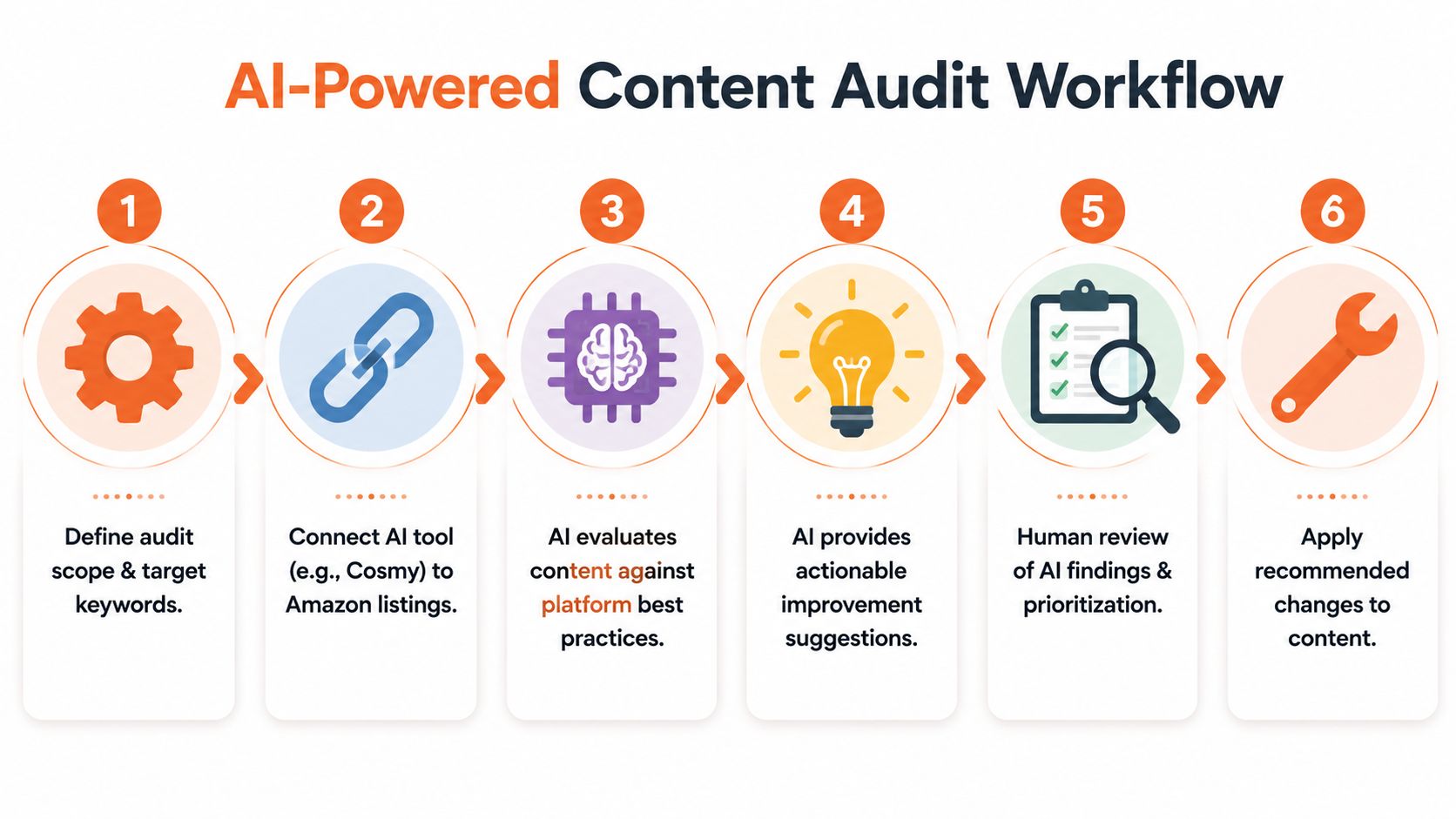
A real example of what the audit should find
Take a premium headset listing. The brand wants to rank for a high-intent query like “best headphones for office calls”. The title mentions wireless, active noise cancelling, and battery life. The bullets repeat comfort, sound quality, and travel use. On paper, it looks fine.
But the listing still struggles for that use case.
The issue often isn't missing keywords in the old SEO sense. It's missing decision language. If a shopper wants headphones for office calls, Amazon's AI may be looking for signals such as microphone clarity, voice pick-up, background noise suppression, call performance in shared spaces, and comfort over a full workday. If the listing talks like a music product while the shopper is asking a work question, relevance breaks.
The fast audit workflow
A useful AI audit should take minutes, not days. The process I've found most practical looks like this:
Choose the target ASINs
Don't audit the whole catalogue. Start with products that already matter commercially or clearly underperform.List the target shopper questions
Write the phrases a real buyer would ask. Not just noun phrases. Full use cases and objections.Run the listing through an AI audit tool
Tools in this category analyse whether the product copy aligns with how AI systems interpret product usefulness. One option is Cosmy, which audits Amazon listings by extracting signals tied to Rufus and CoSMo-style content evaluation, then flags visibility gaps and missing question coverage.Review the mismatch report
You're looking for gaps between what the listing says and what the shopper means.Rewrite only the sections tied to those gaps
Most of the time, that means titles, first bullets, comparison language, and A+ modules.
If you want a more grounded view of how product terms evolve from keyword lists into real product language, this guide on Amazon product keyword strategy is a useful companion.
Here's the kind of before-and-after change that often matters:
Content area | Before | After |
|---|---|---|
Bullet copy | “Premium sound quality for work and travel” | “Clear voice capture for office calls with background noise suppression in shared spaces” |
Title phrase | “Wireless noise-cancelling headphones” | “Wireless headphones for office calls with noise cancelling and clear mic performance” |
A+ support copy | “Built for everyday listening” | “Designed for calls, remote meetings, and focused work sessions” |
Notice what changed. The revised copy doesn't just add terms. It answers the shopper's job to be done.
Human review still matters
A good audit is fast, but it shouldn't publish blindly. Someone still needs to check three things:
Whether the recommendation matches the product truth
Whether the copy still sounds like the brand
Whether the change deserves priority in the sprint
That's the handoff point many teams skip. They either trust the machine too much or ignore it completely.
Later in the workflow, it helps to see the audit process in action before you build your own routine:
The strongest audit output is not a long report. It's a short list of specific copy changes tied to specific shopper intents.
That's what compresses time to market. Not more data. Better diagnosis.
Prioritising Fixes That Drive the Fastest Results
Once the audit output is on the table, speed depends on triage.
Amazon teams lose days here because every recommendation starts to look reasonable. A missing use case in the title, a weak first bullet, outdated A+ comparison charts, gallery refreshes, brand copy clean-up. All useful. Not all worth doing in a 30 to 45 day sprint.
The rule I use is simple. Prioritise the changes that improve query coverage, shopper clarity, or Rufus-readability fastest. Everything else waits.

Score fixes by impact and publishing effort
A practical shortlist needs two filters:
Likely impact on rank, click-through, or conversion
Effort required to rewrite, review, and publish safely
That gives you four working categories:
Impact | Effort | What to do |
|---|---|---|
High | Low | Publish in this sprint |
High | High | Break into phases and start with the highest-yield part |
Low | Low | Pick up only if the team has spare capacity |
Low | High | Park it |
On Amazon, high impact and low effort changes are usually text changes in high-visibility fields. Titles, first bullets, image overlay copy, and A+ headings often move faster than design-heavy updates.
Here's a typical before-and-after prioritisation call from our team:
Recommendation | Why it looked tempting | Better sprint decision |
|---|---|---|
Rewrite title to add “for office calls” | Directly improves relevance for a missed use case | Do now |
Rework first two bullets around mic clarity and background noise | Helps both shopper scanning and AI interpretation | Do now |
Rebuild full Brand Story module | Useful, but slower to approve and publish | Later |
Replace all lifestyle images | Nice improvement, weak short-term search impact | Backlog |
Cut scope before it cuts your sprint
Scope creep in content work rarely looks dramatic. It sounds responsible.
“Let's fix the rest of the bullets while we're here.”
“We should probably update every child ASIN too.”
“Creative can refresh the gallery at the same time.”
“Let's hold until legal reviews the full range.”
That is how a fast optimisation sprint turns into a six-week content project.
The test is commercial, not aesthetic. If the change is unlikely to improve shopper understanding, search relevance, or conversion in this sprint, move it to backlog. As noted earlier, time to market gets worse when nice-to-have work enters a deadline-driven plan.
Focus on fixes that change rank or sales fastest
For Amazon teams using AI, this usually means three types of changes go first:
Missing intent in core copy
If the listing says “wireless headphones” but shoppers search for “headphones for office calls”, fix that gap first.Weak specificity in conversion copy
“Premium sound quality” is vague. “Clear voice capture for office calls in shared spaces” gives the shopper and Amazon's systems more to work with.Support content that reinforces the primary use case
A+ should back up the search story, not introduce a different one.
AI-assisted drafting proves helpful, provided the team uses it with constraints. A structured workflow for AI copywriting in eCommerce teams can cut the time spent producing first drafts, but it does not remove the need to choose the right fixes first.
Treat delays like operational bottlenecks
I explain this to commercial teams the same way I explain stock delays. The critical path matters more than the full wish list.
Operations teams already work this way. Advice on improving China lead times for SMEs focuses on removing avoidable delays, not redesigning the whole supply chain at once. Content sprints need the same discipline. Remove the bottleneck that blocks launch or suppresses discoverability, then ship.
A fast decision table for the sprint
Fix type | Likely impact | Likely effort | Sprint call |
|---|---|---|---|
Add a missing use case to the title | High | Low | Do now |
Rewrite top bullets around target intent | High | Low | Do now |
Update A+ section headers to match use case language | Medium to high | Medium | Do if capacity allows |
Rebuild all A+ modules across the catalogue | Medium | High | Phase later |
Tidy minor wording across every bullet | Low | Medium | Skip for now |
Strong teams do not win this stage by polishing everything. They win by publishing the few changes that improve visibility and sales first.
Executing Your Optimisation Sprint as a Team
Monday morning. The audit is done, the priority ASINs are clear, and everyone agrees the listings need work. By Thursday, the copy deck has 34 comments, brand is questioning claims that were already approved last quarter, and the SEO owner is still waiting for final target terms. That is how a 30-day sprint turns into a 60-day delay.
The fix is operational, not creative. On Amazon, content speed comes from clear decision rights and a short approval path. For our team, that usually means three named owners. One person owns the brief and draft quality. One owns search intent, keyword coverage, and Rufus relevance. One signs off on brand, claims, and commercial risk. Everyone else gives input through those owners, not around them.
That structure matters because Amazon content work rarely fails from lack of ideas. It fails because too many people edit too late.
A practical 30-day rhythm
Keep the sprint tight enough to finish, but detailed enough to ship without rework.
Week 1, scope and lock the brief
Start with the final ASIN list. Then lock the target queries, shopper use cases, and the specific fields you plan to change.
This is also the week to resolve conflicts. If the commercial team wants “giftable” messaging and the search lead wants “travel bottle organiser”, decide which job the listing needs to do first. Leaving that debate open slows every downstream review.
A simple brief is enough if it is specific. We use a format like this:
Primary use case: organiser for travel-size toiletries
Target query cluster: travel bottle organiser, cabin bag toiletries organiser
Fields in scope: title, first three bullets, A+ headers
Fields out of scope: images, Brand Story, backend attributes
Approval owner: brand director by Friday
Weeks 2 and 3, draft, review, and implement in batches
This is the production window. The teams that move fastest do not wait for a perfect master version. They push approved changes through in batches, usually ASIN by ASIN or family by family.
AI helps here if the workflow is controlled. We use it to speed up first drafts, compare old copy against target intent, and tighten weak bullets. A structured process for AI copywriting workflows for eCommerce teams helps teams draft faster without filling listings with generic phrasing.
The review standard should stay practical. Check whether the revision improves relevance, clarity, and conversion. Do not hold up a title rewrite because two stakeholders prefer different adjectives.
Here is the kind of change that earns a place in the sprint:
Before
Title: “Premium Toiletry Bag for Men and Women”
After
Title: “Travel Toiletry Bag Organiser for Cabin Bags, Leak-Resistant Wash Bag with Hanging Hook”
The second version gives Amazon stronger use-case signals and gives shoppers a clearer reason to click.
Another common fix:
Before
Bullet: “High quality materials with stylish design”
After
Bullet: “Keeps travel bottles upright in hand luggage, with wipe-clean lining for spills and a hanging hook for hotel bathrooms”
That is a better sprint edit because it improves search coverage and conversion at the same time.
Week 4, QA, publish, and verify
Week 4 is for final checks, uploads, and making sure the live detail page matches what the team approved. Keep it clean. If fresh rewrite requests appear here, the scope was too loose earlier in the sprint.
Post-publish verification matters more than teams expect. Check that titles rendered correctly, bullets appear in the right order, A+ modules are live, and parent-child variation logic still makes sense. A fast sprint can still lose rank if a publishing error breaks the listing structure.
30-Day Content Sprint Roles & Responsibilities Checklist
Sprint Week | Content Manager | eCommerce/SEO Manager | Brand Manager / Director |
|---|---|---|---|
Week 1 | Gather live copy, catalogue priorities, and any existing launch notes | Confirm target queries, audit findings, and intent gaps | Approve the product shortlist and scope |
Week 1 | Write a one-page brief for each priority ASIN | Validate which gaps are suppressing visibility or relevance | Decide what needs formal review and what can move fast |
Week 2 | Rewrite titles, bullets, and A+ copy against the brief | Check keyword coverage, use-case fit, and cannibalisation risk | Review claims, tone, and commercial fit |
Week 2 | Prepare variant-level copy where product differences matter | Mark up revisions that improve rank potential first | Clear blockers quickly so work keeps moving |
Week 3 | Finalise upload-ready copy and asset notes | Run final QA on search logic and listing structure | Approve the live version |
Week 4 | Verify published content and log issues | Monitor early visibility changes and indexing | Review initial trading impact and nominate next ASINs |
What usually breaks the sprint
Three things cause the delay most often.
Late-stage feedback
Brand or legal joins after the draft is already “finished”, so the team rewrites approved work.Scope drift
New ASINs get added mid-sprint because they look important, which pushes the original priorities off schedule.Approval by committee
Too many reviewers comment directly in the copy, and nobody knows whose change is final.
The teams that ship in 30 to 45 days handle this differently. They keep one tracker, one owner per decision, and one version of the brief. That discipline is what turns AI audit output into live Amazon content that can improve rank and sales.
Measuring ROI and Planning Your Next Sprint
Thirty days after the new content goes live, the question changes. The team is no longer asking whether the copy sounds better. It is asking whether the update earned more visibility, improved conversion, and gave you a faster path to the next launch cycle.
For Amazon teams working in a Rufus-influenced search environment, that review window is usually 30 to 45 days. That is enough time to see whether revised titles, bullets, and A+ content changed indexing, shopper relevance, and early sales performance, without waiting so long that the learning loses value.

What to measure after the sprint
Keep the review tied to the sprint brief. If the goal was to improve discoverability on a set of priority ASINs, measure discoverability first. If the goal was to lift conversion after fixing weak use-case coverage, check conversion and content engagement signals before debating wider brand questions.
A useful post-sprint report usually covers:
Organic visibility changes for the target queries
Session trends on the updated ASINs
Conversion rate movement after the revised content goes live
BSR direction where relevant
Coverage improvements in shopper questions and use-case language
Operational speed, such as audit-to-publish time for the sprint
If your team needs a clearer reporting structure, this guide to eCommerce KPIs for growth teams is a practical reference.
How to present the commercial story
The best ROI readout is usually a one-page before-and-after view with a short explanation of what changed and why it mattered.
Before | After | Why it matters |
|---|---|---|
Listing missed key shopper use cases | Listing now answers core use cases clearly | Better alignment between shopper intent and product message |
Team relied on manual copy rounds | Team used a fixed sprint with clear ownership | Faster implementation and fewer stalled edits |
Reporting focused on sales only | Reporting includes discoverability and conversion indicators | Earlier visibility into whether content changes are working |
Here is the practical difference. Before the sprint, a listing might say “durable design for everyday use”. After the sprint, it says “lightweight travel bottle with leak-resistant lid for commuting, gym bags, and school runs”. The second version gives Amazon more context, gives shoppers a clearer use case, and usually gives the team a better chance of improving rank on relevant long-tail searches.
The same applies to reporting. A weak review says, “sales were flat, so the update failed”. A stronger review says, “indexing improved on six target terms, sessions rose, conversion held steady, and the title change likely fixed a visibility issue before sales fully responded”. That is the level of detail that helps a team decide what to scale.
Repeatability matters more than one good sprint. Strong Amazon teams treat each 30 to 45 day cycle as a system for learning which content fixes move rank fastest, which approval steps waste time, and which ASINs deserve the next round of effort.
Use that learning to plan the next sprint with more precision. Pull forward the ASINs that gained visibility quickly. Drop low-impact edits that only made the page look cleaner. If Cosmy flagged recurring gaps across multiple listings, such as missing compatibility terms or weak problem-solution language, turn those into the first batch of fixes for the next cycle.
That is how content speed turns into business impact. Better copy matters, but the bigger win is a team that can audit, prioritise, publish, and learn fast enough to keep improving rank and sales every month.
If your team wants a faster way to audit Amazon listings and identify which content fixes deserve priority, Cosmy can help. Paste in your product links, review the AI-driven audit, and use the output to run a tighter 30 to 45 day optimisation sprint with clearer decisions and less guesswork.


