Content Audit Template to Fix Listings That Don't Convert


Your catalog can have traffic and still underperform where it matters. A shopper lands on a product page, skims the title, checks the bullets, and leaves because the page never answered the core question. On Amazon, Walmart, and other retail platforms, that usually isn't a keyword problem, it's a content clarity problem.
That's why a content audit template for eCommerce has to do more than list URLs. It needs to tell you which listings should be kept, updated, consolidated, or removed, and it has to do that in a way that's repeatable across thousands of ASINs. The useful version is a decision framework, not a spreadsheet graveyard.
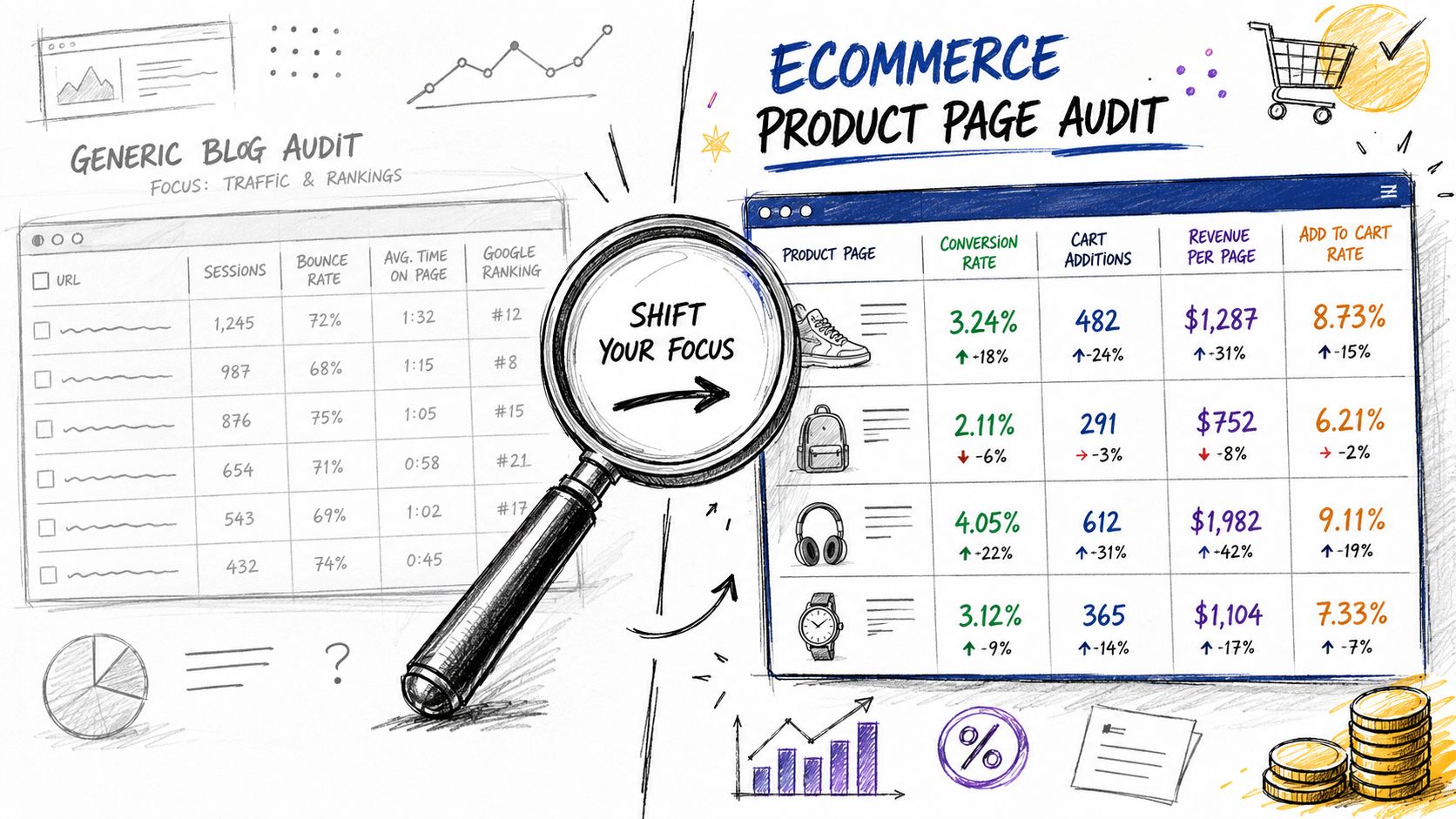
Table of Contents
Why Most Content Audits Miss What Matters for eCommerce
A lot of teams still treat audits like blog housekeeping. They check traffic, rankings, bounce rate, and maybe a few content gaps, then call it a day. That works if you're managing articles, but it misses the reality of product discovery, where the page has to help both a human shopper and an AI system understand what's being sold.
The difference between an inventory and an audit matters here. Nielsen Norman Group defines a content inventory as a list of every piece of digital content you have, while a content audit examines, assesses, and evaluates the quality of the content in that inventory, including pieces that need updating, new content gaps, and items ready for removal, as outlined by NN/g. For commerce teams, that means the page list is only the starting point. The primary job is deciding whether a listing is clear enough to support discoverability and task completion.
The catalog problem most templates ignore
When I audit listings at scale, the same pattern shows up again and again. Titles are incomplete, bullets are generic, descriptions repeat the title, and images don't resolve the shopper's questions. The page technically exists, but it doesn't give Amazon's or Walmart's discovery systems enough structure to work with.
Practical rule: if the listing doesn't help a shopper compare, confirm, and choose, it isn't doing its job, even if the URL is indexed and getting impressions.
That's where a commerce-focused content audit template changes the conversation. It stops asking only, “What content do we have?” and starts asking, “Which product pages are weak on meaning, completeness, or intent?” If you want a broader view of how retail teams are approaching AI-powered discovery, the retailer guide to AEO is a useful companion read.
Consistency is the key benefit. A repeatable template ensures one reviewer doesn't flag a page as “update” while another marks the same page as “keep.” That matters when you're working across a large catalog, because review drift turns audit output into opinion. A good template makes the decision path visible, so the team can move from inventory to action without guessing.
Inside Your Content Audit Template and What Each Field Means
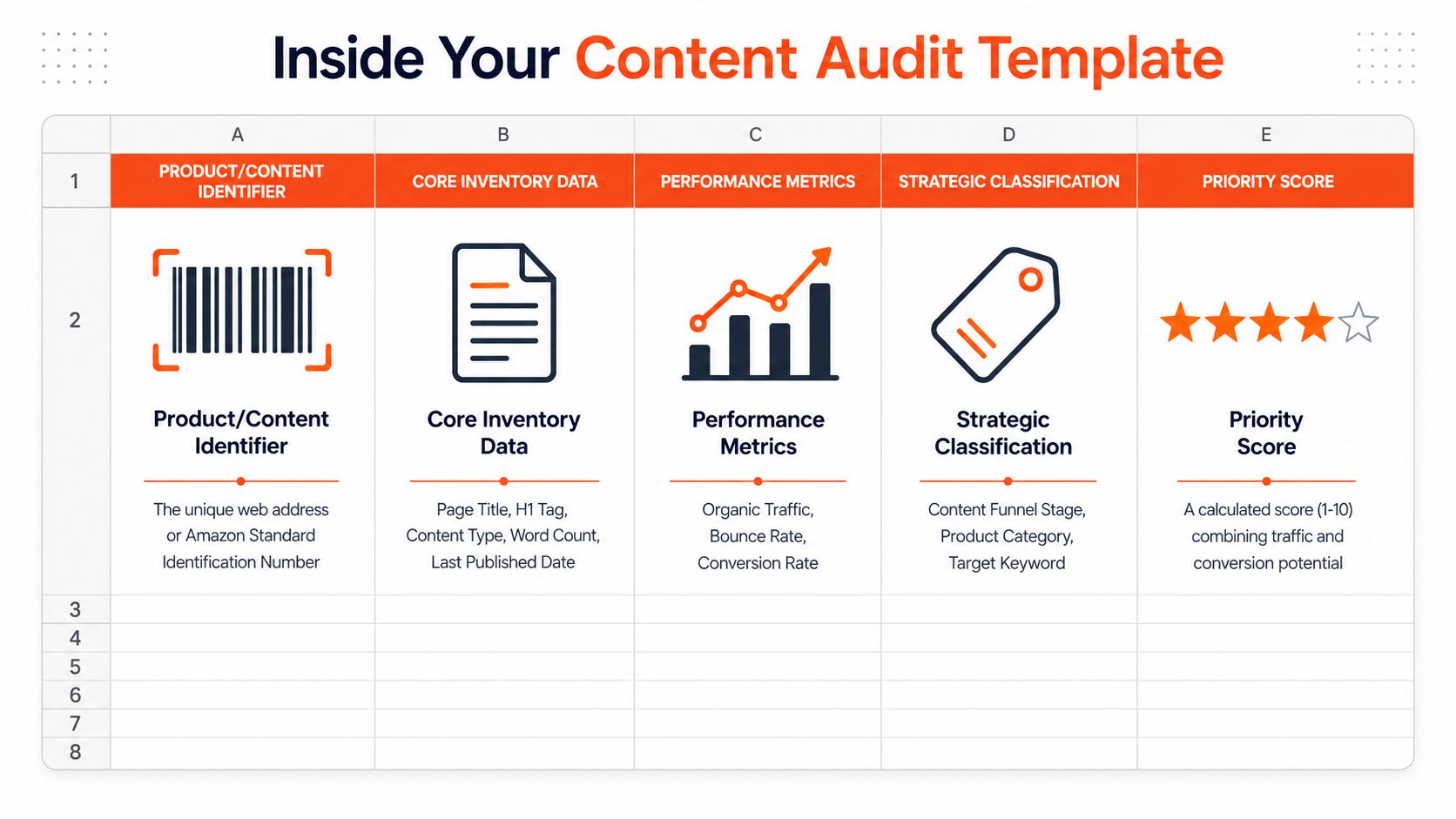
A useful template starts with the basics, then adds the fields that help you judge whether a listing can be found and understood. At minimum, capture the page or listing identifier, page title, H1, content type, word count, last modified date, and meta description, because those fields tell you what the asset is and whether it looks current enough to support discovery. Practical templates also include page-level fields like URL, publish date, and content type, as shown in template guidance.
Inventory fields that keep the audit grounded
The first group of fields is the structural layer. For a site page, that means URL, page title, H1, content type, word count, publish date, and last modified date. For a marketplace listing, the same logic applies, but the identifier becomes the ASIN or marketplace product ID, and you often want extra fields for title length, bullet coverage, and variant relationship.
That inventory layer matters because it lets you compare like with like. A product detail page is not the same as a category page, and neither one should be judged by the same standard as a buying guide. If your sheet does not separate those page types, you will make bad recommendations fast.
Performance fields that show whether the page is moving
The next layer is performance. Modern templates explicitly compare the last three months to the previous three months using Google Search Console data, and many also include a 12-month view to support annual governance, which is the current template pattern. That time framing turns a flat report into a trend check.
The fields that matter most are impressions, clicks, page views, and conversion rate. Use Search Console for organic visibility signals, and use analytics exports for page-level behavior. If a listing gets impressions but weak clicks, the title or main image may be the issue. If clicks are healthy but conversion lags, the page may be failing at task completion.
Qualitative fields that catch what metrics miss
A good audit sheet also needs human judgment columns. Common checks include accuracy, brand voice consistency, readability, CTA effectiveness, image quality, and link validity. More advanced templates go further and include checks like schema markup, page load speed, mobile responsiveness, header hierarchy, and schema-markup support, all of which can affect whether a page is usable and understandable, as seen in advanced template examples.
For eCommerce, I would add listing-specific notes for title completeness, bullet clarity, purchase-intent coverage, and whether the imagery answers the shopper's comparison questions. If you are scoring Amazon content, you can also connect the sheet to a model-based review through the beauty score calculator, which gives teams a more consistent way to evaluate presentation instead of relying on gut feel.
Field guide note: a strong template does not just store data, it makes each row answerable. If you cannot explain why a field is there, it probably does not belong.
How to Run a Content Audit Without Getting Stuck
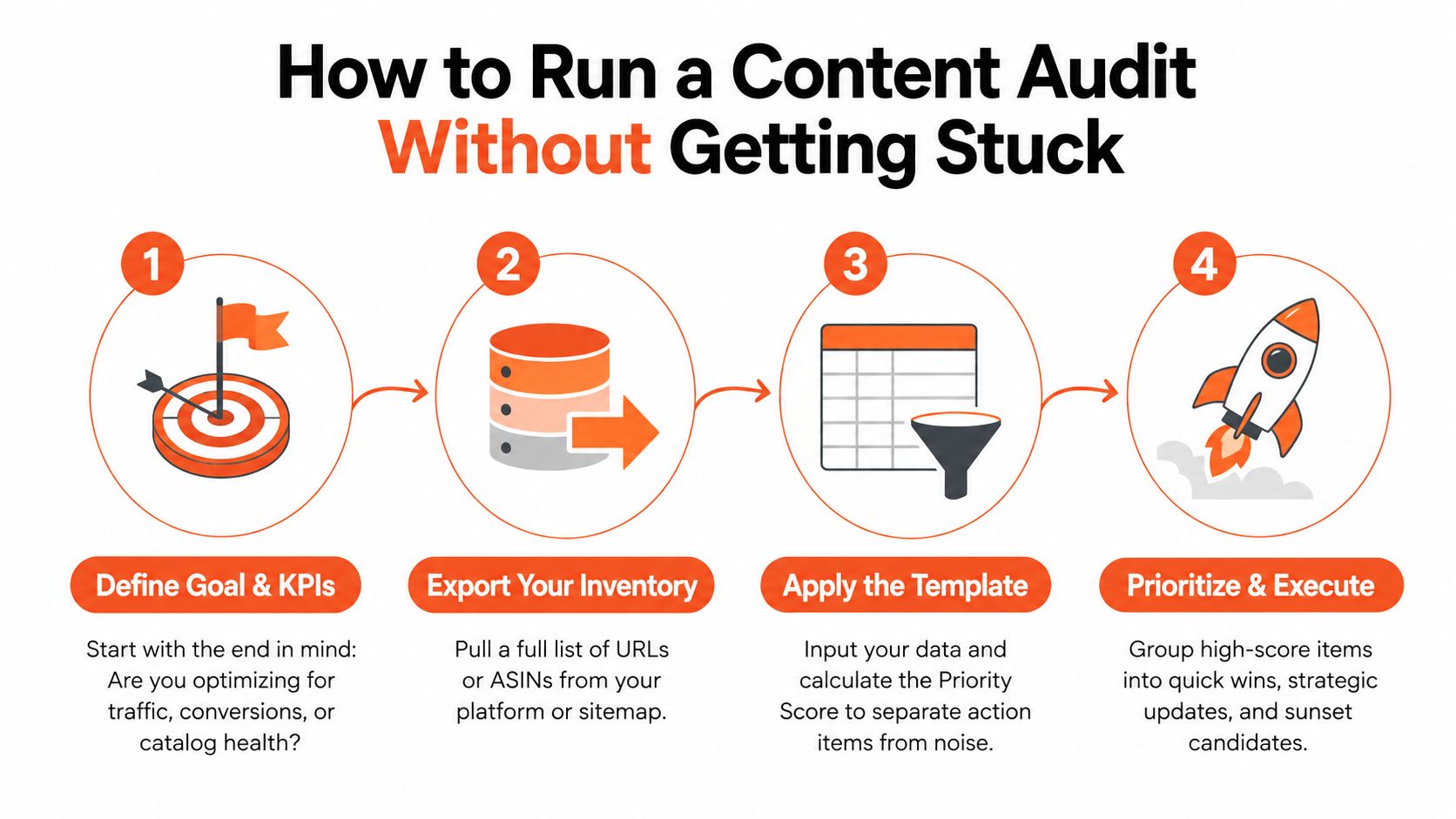
Most audit projects stall before the analysis starts. Someone tries to pull every page, every metric, every note, and the sheet gets so unwieldy that nobody trusts the output. A better method is to define the business question first, then build the inventory around that goal, because the template should work like a decision engine, not a passive record, as described in audit guidance.
Start with one question the team can actually answer
Pick the primary business question before you pull data. Are you trying to improve discoverability, clean up catalog health, or lift conversion on a specific set of listings? That question decides which columns matter most and which content types belong in scope.
Once the goal is clear, export your URLs or ASINs and pull a full historical view into one sheet. Short snapshots hide seasonality and make weak pages look better than they are, which is why a broader audit structure is usually the safer choice, which is the recommended structure for a rigorous audit. The point is not to build a perfect master file on day one. The point is to get one usable view of the library.
Calibrate the template before you scale it
Before you audit the full catalog, work through a sample batch of 5 to 10 pieces per category. That calibration step catches the problems that usually derail the process, including cannibalization, outdated copy, and inconsistent tagging. It also shows where the template itself is too vague, and where reviewers are interpreting the same field in different ways, a practice recommended in expert guidance.
If you are auditing marketplace content, assign ownership early. Content teams usually own copy quality, SEO owns visibility signals, and product or merchandising owns catalog accuracy. If nobody owns the row, the row never changes.
Operational rule: do not audit everything at once. Audit a small batch, tighten the scoring logic, then move category by category.
Use time windows to separate noise from trend
A content audit gets much more useful when the team compares a fixed period against the one before it. That is why the three-month versus previous three-month view is so common in modern templates, using Search Console performance data. It shows whether a page is rising, flat, or slipping.
A 12-month baseline gives you the longer view. The short window helps you see momentum, while the longer window helps you spot pages that are losing relevance. Together, they make the audit sheet act like a governance tool instead of a snapshot. For product pages, this is also where AI comprehension matters, because a listing can earn impressions and still miss the shopper's intent if the title, bullets, and images do not line up with how assistants like Alexa for Shopping interpret the item.
Scoring Content and Prioritizing What to Fix First
A filled-out template still is not enough. The value comes from scoring each row so the team can decide what gets fixed first, what gets merged, and what should be retired. In a commerce audit, that scoring turns a content audit template into a live backlog instead of a static worksheet.
A simple scoring model that works in commerce
Start with the performance signals that show demand, then layer in the page quality checks that affect whether shoppers can use the content. That means looking at impressions, clicks, page views, conversion rate, dwell time, and bounce rate, then checking whether the page is readable, mobile-friendly, and structurally sound. For commerce pages, I also score title completeness, bullet clarity, and whether the description answers purchase-intent questions.
The point is not to build a mathematically pure score. The point is to separate pages that need a light refresh from pages that need a full rewrite or consolidation. On Amazon, that usually means checking whether the content matches shopper language and whether the listing supports AI comprehension, not whether it is stuffed with the target phrase. If your audit is tied to listing work, the same logic shows up in ecommerce SEO strategies, where relevance, structure, and listing clarity matter as much as raw traffic.
Use the action field consistently
The action column should stay simple. Keep, update/refresh, consolidate, or remove+redirect. That structure is recommended in rigorous audit workflows because it forces a decision on every row, as described by Orbit Media.
For content retention, some public-sector guidance is even stricter. Iowa's DX Training says content should be unpublished and not moved if you cannot answer yes to all three questions, whether it is intended for public use, whether its purpose is archival, and whether it is up to date, which is a practical retention test. That is a good reminder that traffic alone does not justify keeping a page.
Sample Content Audit Scoring and Action Matrix
URL / ASIN | Performance Trend | Quality Issues | Priority Score | Action |
|---|---|---|---|---|
ASIN A1 | Flat impressions, weak clicks | Title incomplete, bullets vague, image set unclear | High | Update |
Product page B2 | Declining page views | Duplicate intent with another SKU, weak differentiation | High | Consolidate |
Category page C3 | Stable traffic, decent engagement | Minor readability issues, missing schema cues | Medium | Keep |
That matrix is intentionally blunt. It keeps the team from debating every page as if it were unique. Once the score is in place, the backlog becomes a sequence of jobs, not a philosophical argument.
If you are scoring Amazon listings specifically, a model-based lens helps separate cosmetic edits from changes that affect discovery. Cosmy's ecommerce SEO strategies resource is a useful reference point for teams mapping audit findings to listing rewrites and search relevance.
Turning Audit Results Into an Action Plan That Ships
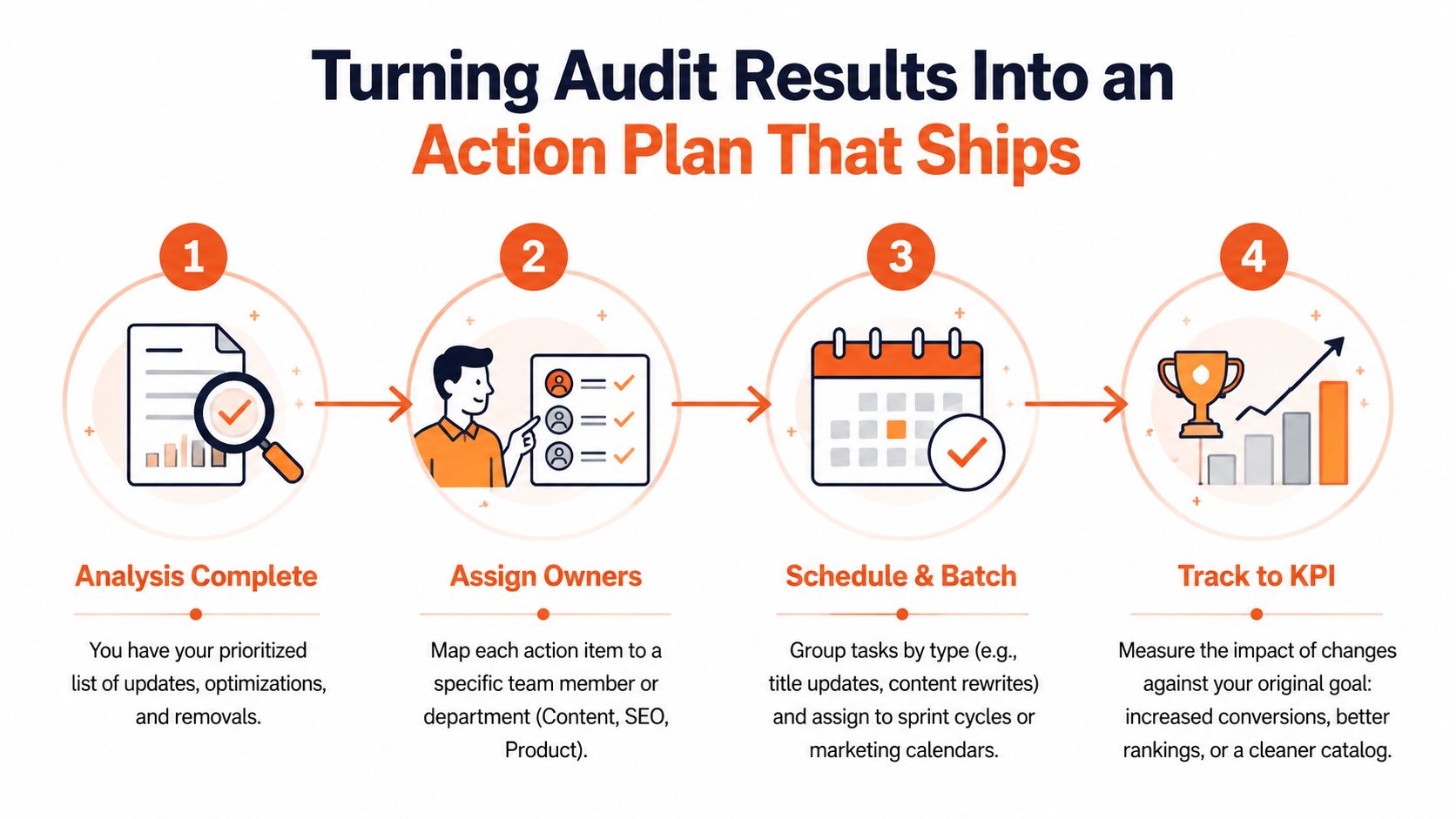
Most audit programs fail at the handoff. The analysis is solid, the sheet is clean, and then nothing gets published because nobody mapped the work to owners and timelines. A good audit ends with a plan that fits how marketplace teams ship content, not just how they measure it.
Turn each action into a real owner and a real deliverable
The cleanest way to do this is to map each row to the team that can change it. Content owns copy updates, SEO owns metadata and internal linking, and product or merchandising owns catalog accuracy and variant logic. If the action is a consolidation, one person has to own the surviving page and the redirect plan.
For marketplaces, the work should be tied to listing components, not just the page as a whole. Titles usually go first because they affect discoverability, then bullets, then descriptions. If the page is stale or redundant, remove or redirect it instead of trying to “optimize” content that shouldn't exist.
Batch the work so the team can ship
Don't route one-off edits through the calendar if you can help it. Group the updates by category, by content type, or by fix type. That makes it easier to schedule title rewrites together, handle description refreshes in one pass, and send consolidation work through a separate review lane.
This is also where commerce-specific auditing matters. Generic templates focus on traffic, rankings, bounce rate, E-E-A-T, and readability, but they rarely spell out how to evaluate listings against task completion and conversion criteria, which is the gap most commerce teams run into. On Amazon and Walmart, discoverability is only useful if the shopper can move from search result to confident purchase.
Track the work against the original KPI
A clean action plan should tie back to the goal you set at the beginning. If the goal was discoverability, monitor click share and ranking movement. If the goal was conversion, watch whether the revised listing answers shopper questions more cleanly. If the goal was catalog health, check whether the number of redundant or stale pages goes down.
Cosmy can sit in that workflow as one option for teams that want to audit listings through CoSMo and Alexa for Shopping signals and then generate publish-ready copy from the findings. That kind of output is more useful than a static report because it gives the team something concrete to send to production.
If you want a broader KPI framework for connecting content work to business outcomes, the e-commerce KPI guide is a natural follow-up for setting the right measurement layer.
Making Your Next Audit Faster and More Reliable
A repeatable audit is the one a team can finish without dragging its feet. In practice, that means keeping the same baseline window, the same comparison window, and the same action labels every time. For commerce teams, the goal is usually a clean before-and-after read on product pages, so the sheet has to work the same way each run, whether you are checking catalog health, search visibility, or how well a listing supports shopper intent. If you need a broader starting point, you can conduct an SEO content audit and then adapt the framework to product pages.
A living template also needs version control. Save each audit, record the decision rules that shaped the scores, and update the thresholds after every batch so the next pass is easier to trust. That matters more than polishing the sheet with extra tabs or formulas.
Three habits keep the process honest. First, version the spreadsheet so earlier calls stay visible. Second, document the scoring rules so every reviewer is using the same yardstick. Third, recalibrate after each batch so the template keeps matching what your catalog does in search and on the shelf.
The bigger shift is the same one showing up across Amazon, Walmart, and other retail platforms. Product content has to be written for AI comprehension, not keyword stuffing. Clear, complete, and relevant copy gives shoppers a faster answer and gives discovery systems less room to misread the listing. That is where fields in the audit should map to signals like CoSMo-style relevance checks and Alexa for Shopping compatibility, not just generic blog metrics.
If your current audit sheet still feels built for articles, rebuild it around listings and run a small pilot first. Use the first 10-row test to see whether the template catches missing attributes, weak intent match, and unclear answers before you roll it across the catalog. From there, the sheet stops being a one-off cleanup tool and starts acting like part of governance.
Cosmy audits and rewrites product listings through CoSMo and Alexa for Shopping signals, so teams can see where discovery is breaking down and fix the copy that shoppers read. If you're ready to turn your next content audit template into a working listing workflow, visit Cosmy and start with a focused ASIN audit.